ADMINISTRATOR TUTORIAL
Install a relay and approve your first user.
1. Check the host
docker --version
docker compose version
docker network inspect ingress >/dev/null
You need a Linux host, POSIX sh, DNS for separate app and relay hostnames, Caddy, and an existing ingress network. Alpine Linux is tested, not mandatory; other distributions were not claimed as tested. Keep relay port 1991 private.
2. Install
release_unpack=$(mktemp -d /tmp/lettres-0.20.0.XXXXXX)
tar -xzf lettres-0.20.0.tar.gz -C "$release_unpack"
cd "$release_unpack/lettres"
doas ./install.sh
export PATH="$HOME/.local/bin:$PATH"
Always use a newly created empty extraction directory; never unpack over an older source tree. The installer validates the source before it invokes Docker or stops the running deployment. The interactive path asks for production settings and the relay enrollment password. ./install.sh -y is a development shortcut and prints its generated enrollment password once on a fresh installation. Fresh setup initializes the relay identity/database pair before optional bot registration, including with --no-start. If the 0.19.0 installer already left an unused database without an identity, run the 0.20.0 installer with --replace-code --repair-fresh-state; it repairs only a database proven to contain no relay traffic, otherwise it requires the matching identity backup.
3. Connect Caddy
lettres caddy password /opt/stacks/caddy/.env
lettres caddy
Load the env file in Caddy, add the printed blocks, and reload Caddy. The app uses the Lettres hostname. The protected dashboard is https://YOUR-RELAY-DOMAIN/admin.
4. Verify and approve a user
lettres version
lettres doctor
lettres health
lettres health public
lettres status
lettres applications list pending
lettres applications inspect reg_EXACT_ID
lettres applications accept reg_EXACT_ID
lettres users list
lettres version reports selected installed code, protocol, and build; lettres health verifies loopback containers, compatibility, and the persistent relay key; and lettres health public verifies what a new browser receives through Caddy. All must report Lettres 0.20.0 / protocol 1.7 / build lettres-0.20.0-1. If local is current but public is old, fix Caddy's upstream/network; clearing Chrome cannot deploy server code. Give a user the app URL and enrollment password—not the admin password. They select Request access to the relay. Verify the pending fingerprint, then accept it in the dashboard or CLI. Under Authorized identities, Public contact opens canonical JSON with Copy/Download for enrolled, CLI, and bot keys.
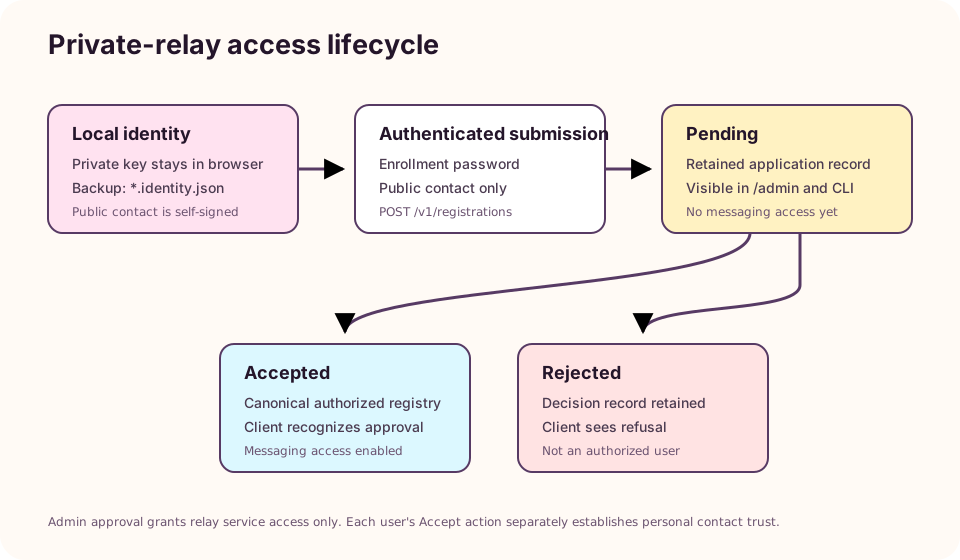
Relay approval permits service use. It does not make every user accept the applicant as a contact.
5. Optional: share the issue bot
lettres bot status
lettres issues contact ./lettres-issue-tracker.contact.json
Give only this public contact file to users. They select + Add contact, import it, send /help, then a problem description; success is a received Created issue #… reply. Use lettres bot logs --tail 100 if not. Never distribute the bot's private identity. The Bot guide has the full workflow.
Caddy-protected admin
lettres caddy password /opt/stacks/caddy/.env
lettres caddy
Load that env file in the Caddy service. Use bcrypt without an argon2id directive. The relay proxy block must include header_up Remote-User {http.auth.user.id}. Keep relay port 1991 on loopback. The canonical dashboard is https://YOUR-RELAY-DOMAIN/admin; browser mutations require its exact normalized origin in cors.allowedOrigins or LETTRES_PUBLIC_ORIGINS. The installer/Compose configuration includes both selected public origins without trusting forwarded host headers.
Register identities or enable applications
lettres identity generate "Alice" /secure/keys
lettres users add /secure/keys/alice.contact.json user
lettres enrollment password
lettres applications list pending
lettres applications inspect reg_ID
lettres applications accept reg_ID
lettres applications refuse reg_ID
lettres applications list refused
Direct registration and application acceptance use canonical public-contact validation and one authoritative SQLite registry. The admin view lists all retained Pending, Accepted, and Rejected applications, refreshes after actions and periodic polling, preserves last-known data during transient errors, and pauses in background tabs. CLI-provisioned users may appear in Authorized identities without an application row. The enrollment password is a salted scrypt hash; authentication is checked before the submission body is read. Never paste an abbreviated scrypt$...$... placeholder into the config.
Issue tracker
lettres issues contact ./lettres-issue-tracker.contact.json
lettres issues list
lettres issues show 42
lettres issues export --format markdown > issues.md
lettres issues export --format json > issues.json
The optional separate bot is registered only with role bot. Import config/contacts/issue-tracker.contact.json into clients. Reports are encrypted in transit but decrypted/stored by this server-operated bot and readable by configured maintainers. These commands read the same durable store and work while the bot is stopped. Physical backup includes enabled issue data.
Storage cleanup
Local cleanup affects only synchronized old conversation records in one browser and preserves its outbox/account state. Relay cleanup is visible only to users with the admin role and is also enforced server-side. It removes eligible old relay ciphertext after signed tombstones: existing device copies remain, but devices cannot retrieve purged data later. Back up before compaction.
Back up, upgrade, and recover
lettres doctor   # record effective paths and relay public key ID
lettres backup
lettres users export
lettres messages export
# run the new extracted ./install.sh -y --replace-code
lettres version && lettres doctor && lettres health
# reload the outer Caddy deployment, then:
lettres health public
A physical backup preserves configuration, SQLite, applications, relay identity, and enabled issue-bot state. An upgrade must use the identical saved data path. Before stopping, 0.19 rejects a missing/half-empty relay identity or database and prints the public key ID; after stopping it creates an automatic pre-upgrade archive and restarts the old release if that backup fails. Local/public health independently verify exact build metadata, directional compatibility, and the running relay ID. Protocol remains 1.7 and schemas remain 2. Restore on an isolated host first.
Public-test upgrades
Never reuse a build ID. A self-contained candidate worker owns its literal build, fetches every reader/crypto asset without HTTP-cache imports, rejects wrong headers/types/mixed rollout, and becomes Ready only after its exact cache is complete. Smoke-test one clean and one retained 0.18 profile with identity, history/media, saved draft, settings, and a queued attachment; use the header Update action and compare record/queue counts. Keep backups and the previous complete release/cache while old tabs exist.
Diagnose
lettres status
lettres logs boite-aux-lettres
curl -fsS http://127.0.0.1:1991/v1/info
curl -fsS http://127.0.0.1:1991/healthz
A 401 from /admin means ingress authentication/header forwarding failed. A registration 401 means a rejected enrollment password; 404 means disabled; 503/ENROLLMENT_MISCONFIGURED means the configured hash is malformed; 400 means invalid/non-public contact data. The dashboard distinguishes signed registration-status checks from authenticated message/history traffic; neither field survives a process restart. If the relay key changed, first restore the correct identity/database. For intentional replacement, users compare the full fingerprint out of band and use the explicit verified-replacement control, which retains the old public key for historical receipt checks. Never reset a browser to solve relay trust.