USER GUIDE
Using Lettres.
Your private identity stays in trusted browsers. Public contacts may be exchanged. The relay stores encrypted records and cannot read message or file contents.
Read first; connect and update second
Lettres opens its local replica before relay checks. With this browser's retained identity, records, and cached reader, conversations and available media remain readable during an outage, incompatible relay, access change, or trust warning. Drafts and safely committed sends remain local and queued. The header Update action appears only for a verified newer applicable web release, its preparation/application, or its staged candidate; current, unknown, same-build, older, inconsistent, and ordinary offline checks leave it hidden. Settings → Check server & update is always present. Updating preserves IndexedDB and reloads only after the exact complete worker takes control. Saved drafts and queues do not block it; finish only an active edit, recording, or unpersisted file choice.
Retry connection rechecks access, compatibility, relay metadata, and queued work without clearing identity, trust, or history. A Trust changed warning requires restoring the expected relay identity or comparing the full replacement fingerprint with the administrator through another trusted channel. Factory reset is destructive and is never an update/reconnect step.
Getting started
- Choose Create a new identity, or choose an existing
.identity.jsonand select Import identity. - When creating, save the downloaded private backup in encrypted storage. Browser storage is not a durable backup.
- Select Request access to the relay, enter the administrator-supplied enrollment password, and wait for Accepted.
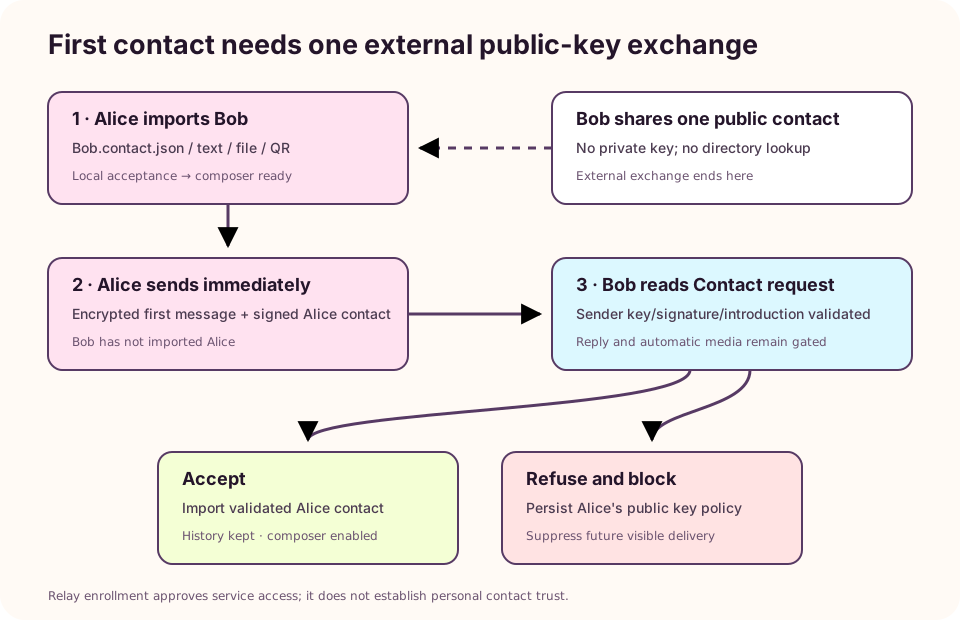
- Select + Add contact and import one friend's public
.contact.json, text, file, or QR. Their empty conversation opens with the composer visible. - Type and send immediately. Your friend does not need to import your key first.
- Your friend reads the message under Contact request, then chooses Accept to reply or Refuse and block.
Success means the sender sees one queued outgoing bubble and the recipient sees the readable request. Only the sender needed an external public-contact exchange.
This relay is private. A submitted public identity remains pending until an administrator approves it. The main screen reports local-only, submitting, pending, accepted, refused, or temporarily unavailable state. An open pending tab recognizes CLI or browser approval automatically. Private identity data is never placed in public QR, platform share, relay applications, status checks, or admin listings.
The enrollment modal can always be closed with ×, Cancel, outside click, or Escape. It reports rejected passwords, disabled enrollment, malformed relay configuration, server errors, and connection errors in the page and tells you when no identity was submitted.
Add, request, and share contacts
Select + Add contact, then paste public JSON, choose a .contact.json, scan with the camera, or select a QR image. Every route uses the same signed-contact validator. Checking, valid, and error feedback are visibly distinct. A positive check means only that the signed public contact is valid locally; it does not verify the person's real-world identity, relay access, or personal acceptance. The friendly-name field is optional when the verified key already contains a meaningful name; your meaningful entry wins, otherwise Lettres displays the key name. If neither exists, Lettres asks for a name before import. Names are local aliases and never rewrite the signed public contact; re-import keeps an existing deliberate alias. A valid contact can be imported offline or before its owner receives relay access. Its conversation and drafts remain local and the composer stays enabled. If Send is selected, the committed bubble remains on this device as Waiting for contact's relay approval; it will retry when this client is open, connected, and authorization becomes available. Re-importing a blocked key tells you to unblock it explicitly. Use /share_contact or contact menu → Share contact to send the canonical encrypted contact card.
A valid first message from an unknown sender carries its signed public contact and appears as a labeled Contact request. Read it, then choose Accept, Delete conversation, or Refuse and block. Reply/reaction/attachment/commands stay disabled until acceptance; pending attachments load only after an explicit tap. Delete hides current history but allows a genuinely later request. Blocking suppresses that key before feed, unread, notification, and automatic media projection; manage it in Settings → Blocked accounts. Unblock allows later messages without accepting or replaying the backlog. The encrypted policy reaches offline replicas only after reconnecting; the relay may retain ciphertext because it does not store your block list in plaintext.
Settings → Contact requests → Show contact requests in the conversation list is enabled by default and saved on this browser. Hiding is not accepting, refusing, blocking, deleting, or silencing. Use the sidebar's Contact requests entry or Open contact requests in Settings to read and act on hidden requests.
Write, format, react, and select
The empty composer is one line. Enter sends and Shift+Enter inserts a line; real text grows to a bounded height. Type / for commands. Each conversation has its own device-local text/reply draft, scoped to this identity and relay. Switching contacts restores only that conversation's draft, including after a normal reload. Selected files remain bound to their originating conversation while this tab stays open, but must be selected again after a reload. Safe Markdown supports bubble-sized # Heading and ## Subheading, emphasis, code, and HTTP(S) links while executable content remains text. Ordinary prose keeps its exact spaces/digits; emoji glyphs mixed into prose and the composer are enlarged for recognition, while one-to-three emoji-only messages retain their larger display.
Reply quotes show a compact preview for text, photos, albums, audio, files, and shared contacts. Published photo/album quotes rehydrate their thumbnail from retained encrypted chunks after reload and fall back cleanly when bytes are absent. Non-image files always use a document/extension badge and never an image decoder. Click or focus and activate a quote to load and jump to its stable original; Lettres explains when a deleted or trimmed original cannot be recovered.
Outside selection mode, at most one four-reaction row opens. Applied badges remain visible and aggregate one effective reaction per sender; numeric counts use normal UI text. Selection closes every choice row. The discreet selection dot is top-right for your sent/pending bubbles and top-left for received bubbles. Native text selection still wins. One 44-pixel action toolbar is physically outside the transformed chat; its selection count never wraps, and it stays above the latest selected bubble with a visible gap when space permits.
Pending sends appear immediately and keep the same selectable, full-height bubble through local preparation, offline waiting, recipient-approval waiting, upload, and confirmation. Multiple tall messages remain reachable through normal conversation scrolling. Once local storage accepts one item, the composer accepts another; several texts, albums, audio notes, or files may wait offline and resume after reopening. Select a not-yet-published bubble to Cancel sending, including while album chunks upload. Cancelling one middle item leaves the rest queued. Relay acceptance is not a delivered/read receipt; if final publication is already in flight, Lettres keeps the honest delivery-unconfirmed behavior. Recipient-access waiting, generic network failures, blocks, and sender-access failures remain distinct. A definitive local prepublication failure removes its invalid placeholder and preserves/restores practical input. Failed edits/deletes never remove the original.
Select one own synchronized text or media message to Edit or Delete it. Edits retain the original ID/position and show Edited. Protocol 1.7 deletions hide the original on supporting clients but cannot retract a download, screenshot, export, backup, or older-client copy.
Send and view files
When the text field is empty, choose Attach a file (paperclip) for any file, Choose photos (landscape) for a multiple image-filtered native picker with no camera capture request, Take a photo (camera) for capture, or Record an audio message (microphone). The operating system/browser chooses whether that image surface is called Photos, Gallery, or Files. Chosen files appear before sending and can be individually removed or cancelled. The preview stays bound to the identity/conversation/draft that opened the picker even if you navigate before it returns; unsupported non-image results are reported. Multiple photos form one album. Every referenced image chunk is acknowledged before the final album message can publish.
The ordinary app shell keeps one-finger scrolling, text selection, forms, and controls while suppressing routine page pinch. Inactive mobile panes and closed Settings are contained and inert. Dialogs, pickers, toolbars, notices, and previews use the current visual viewport in CSS pixels and scroll internally around browser chrome, keyboard, safe areas, orientation, and accessibility zoom. Single photos and albums keep separate gesture ownership in the fitted viewer: boundary-aware previous/next controls, arrow keys, spatial horizontal trackpad/touch drag, image pinch or desktop zoom, zoomed panning, download, copy, platform share, Lettres forward, and deliberate removal. Minimum zoom uses the actual drawable area so the whole portrait, panorama, or small image is visible without panning, including after a resize or mixed-aspect album change. Removing only the local copy keeps the message card and offers Download again while relay data remains complete. A linked-device removal stays distinct and does not delete another person's copy or promise relay erasure.
Audio notes do not display storage filenames. During preparation Lettres verifies the encoded recording's duration and stores it in seconds. Sent, received, reloaded, and Shared-media players show a known total before first playback, use a high-contrast range track/thumb on sent and received surfaces, keep the slider tied to the active media element, and support repeated seeking, replay, download, and 1×, 1.5×, 2×, 2.5×, and 3× speed. Conversation elapsed/total time stays 10px at the footer's left; the message timestamp/status remains on the right. Older audio is measured from reconstructed bytes where possible; missing, incomplete, or undecodable audio reaches a clear retryable state instead of loading forever. The exact limit is 16 MiB (16777216 bytes) per original file, not per album; two valid 10 MiB images are accepted, while a file one byte over is named and refused without sending a partial album. Accepted media is encrypted in independent 192 KiB chunks and digest-verified after loading.
Shared media and links
Open Shared media & Links in the contact menu. Images, Audio, Files, and Links load in bounded date-grouped pages with newest entries at the bottom. Choose Both, Sent, or Received; the saved discussion filter uses the authenticated original sender and every item says Sent by you or Received from NAME. Conversation and Shared audio use the same reconstructed bytes, duration metadata, controls, and bounded retry behavior. Edits and deletions use the same effective projection as the conversation. Nearby media preloads while distant items remain placeholders. Link search filters only already loaded plaintext in this browser and makes no request per keystroke.
Appearance and devices
Settings keeps Replica, Devices, and Appearance separate. Devices shows only replicas of this identity, marking the current browser and reporting synchronized last-seen activity rather than claiming live presence. Labels are user controlled; no browser, hardware, operating-system, or hostname fingerprint is sent.
Select auto/light/dark, Orchid/Lagoon/Ember/Graphite, and OpenMoji Color/OpenMoji B&W/System Emoji. A discussion can use a device-only or replica-shared scheme. Precedence is local discussion override, shared discussion preference, then global scheme; a local override survives later shared updates.
Storage cleanup
Remove older local copies removes synchronized non-account records older than Keep days only from this browser. It keeps queued sends and account settings, leaves the relay copy intact, and keeps the record hidden during normal resync until explicitly recovered. The admin-only relay action permanently removes eligible old relay ciphertext after signed deletion records; existing local copies remain, but devices cannot fetch the deleted records later.
Notifications and PWA lifecycle
Notifications are opt-in under each accepted conversation's settings. Enable the switch and select Send test notification; its status distinguishes browser permission from the active worker's persistent showNotification() path. Browser acceptance does not prove the operating system displayed a banner. Check site/conversation permission, OS notification and do-not-disturb settings; on Linux/postmarketOS also check the desktop session notification service, and on iPhone/iPad use a supported Home Screen context with the explicit user action. Normal alerts are generic, grouped, and exclude letter excerpts, keys, chunks, reactions, protocol controls, pending/blocked contacts, muted conversations, and only the currently visible-and-focused discussion. A click focuses/opens Lettres and navigates only to a locally validated accepted conversation.
| Lifecycle | 0.20 behavior |
|---|---|
| Open and active | The document owns sync, SSE hints, queue work, media loads, and eligible notification presentation. |
| Hidden/minimized and still running | Work may continue while the browser permits it; scheduling/networking are not guaranteed. |
| Frozen/suspended | Tasks may stop; durable local state remains. |
| Closed/discarded/process stopped | The message loop does not run and no new closed-app message delivery occurs. |
| Reopened/resumed | Local state opens first, then one coalesced wake reconnects stale SSE and resumes the existing outbox. |
Installing changes launch/display integration, not processing ownership. The worker presents notifications requested by running code but has no Web Push subscription/handler or background message-sync task. Real closed-app delivery would need an explicit consent/subscription/relay/privacy design and still could not promise execution after an OS force-stop.
Offline, updates, and recovery
Offline sends remain durable and retry. Do not clear local data while the outbox contains the only copy. A self-contained candidate worker stages a complete exact-build cache—including crypto modules—and deletes a partial candidate on any interrupted/mixed/wrong-type/cache-write failure. Update available therefore identifies a verified newer waiting build; activation preserves saved drafts and queues, coordinates open tabs without forcing another tab mid-edit, and reloads only after controller verification. The current reader cache uses a namespace the supplied v0.18 worker cannot delete during concurrent installation.
Check server & update exists at the bottom of the first identity screen and in Settings. It bypasses the offline cache, then shows the loaded build, server web image, mounted config, and relay runtime separately. If it says no newer release is deployed, that claim is scoped to this server. A private window showing an old server version means the administrator must deploy or fix the public route; browser cleanup cannot invent missing code.
Open /v1/client-repair.html only as the network-only non-destructive bootstrap for older/stuck code. Its script has no ordinary module imports. Refresh application files removes only lettres-reader-* and legacy lettres-static-* caches plus same-origin workers, preserving IndexedDB, identity, messages, contacts, preferences, drafts, and outbox. The confirmed Factory reset this browser deletes all local stores and every cache/worker but never relay data; it is separate and never the normal update instruction.
Made with love by Simulated Generation and Doc Quantic.